

Zillow’s sell landing page scores 64 out of 100 on mobile CTA effectiveness according to LandingMetrics benchmarking, and that mediocre grade still beats the vast majority of independent agent websites where primary conversion buttons sit buried below photo galleries, property descriptions, and everything else that competes for attention.
The pattern is consistent across thousands of agent sites: the thing designed to capture leads sits in the exact spot visitors are least likely to see. Centered CTA buttons generate 682% more clicks than left-aligned versions. Pages featuring CTAs at both top and bottom convert 25% better than single-placement pages. Inline buttons embedded within content deliver 121% higher click-through rates than sidebar placements. These numbers aren’t small rounding differences. They represent the gap between an agent who captures three leads a week and one who captures fifteen, using the same traffic volume and the same listing content.
What makes this problem so persistent is that agents don’t realize they’re doing it. The CTA is on the page. It exists. They can point to it. But existence and visibility are different things, and the audit most agents need to run starts with that distinction.
Where the Buttons Actually Are
Pull up any standard real estate website template and scroll through a listing page. You’ll find the primary CTA in one of three default positions: a sidebar widget labeled “Contact Agent,” a button at the very bottom of the property description, or a static header bar that blends into the navigation. All three of these positions have documented problems. Sidebar CTAs suffer from banner blindness, a well-studied phenomenon where visitors’ eyes skip right-column content entirely after years of conditioning by display ads. Bottom-of-page buttons assume the visitor reads every word of copy before acting, which analytics data consistently disproves. And header-bar CTAs compete with navigation elements, search bars, and branding logos for the same narrow strip of screen real estate.
The research from Agent Image’s analysis of 53 real estate CTA implementations identifies the effective placement zones as top of page above the fold for early interest, mid-content after listings or testimonials, and footer-level reinforcement. The critical word there is “and.” The best-converting pages use all three tiers simultaneously. A single CTA positioned in one location performs measurably worse than a distributed approach where the visitor encounters a relevant prompt at multiple scroll depths. Yet most agent sites follow a one-button-per-page philosophy, as if repeating the call to action would somehow offend the visitor.
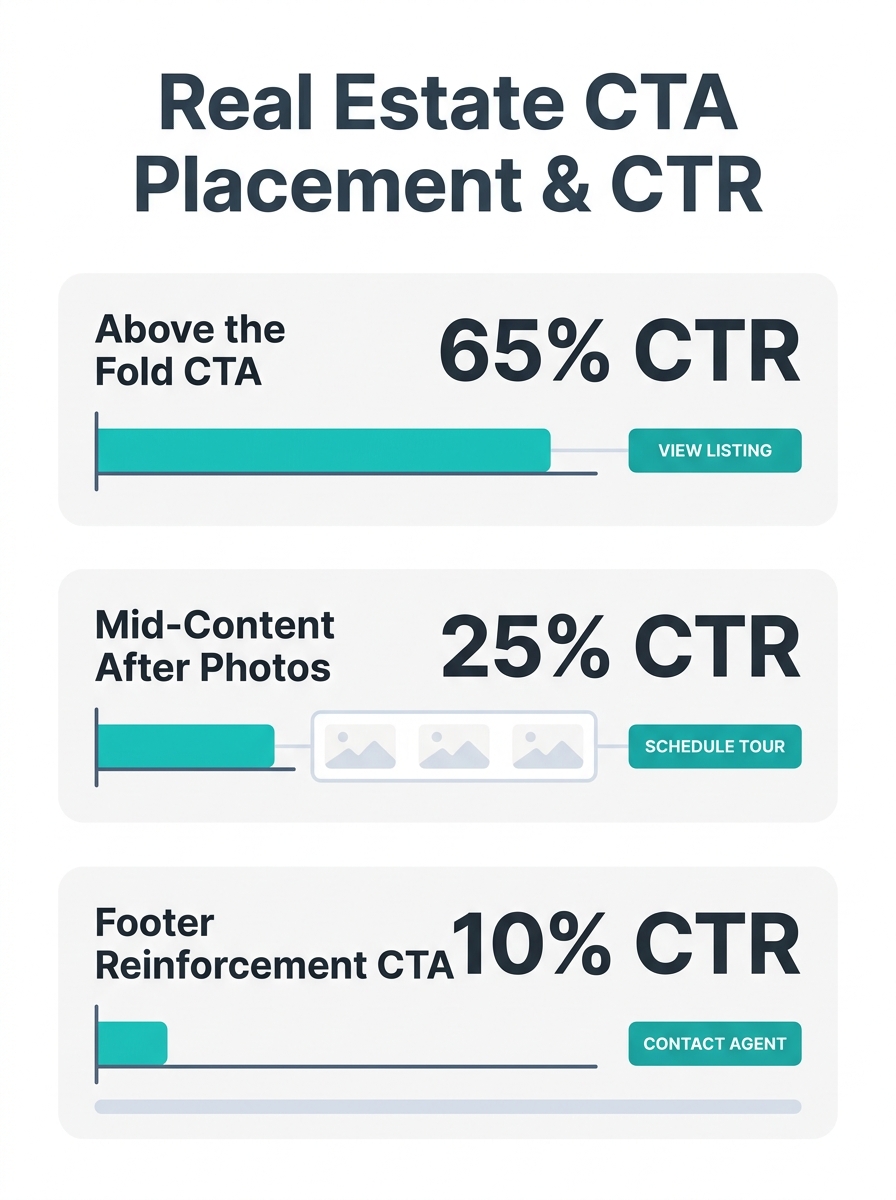
This connects directly to the design choices that kill lead quality before nurturing begins. When you force a visitor to scroll past 2,000 pixels of property photos and neighborhood descriptions to find the “Schedule a Showing” button, you’ve already lost the impulse clickers, the mobile browsers, and anyone who opened your page in a multi-tab comparison session. The button might as well not exist for 60-70% of your traffic.
The Geometry of a Click
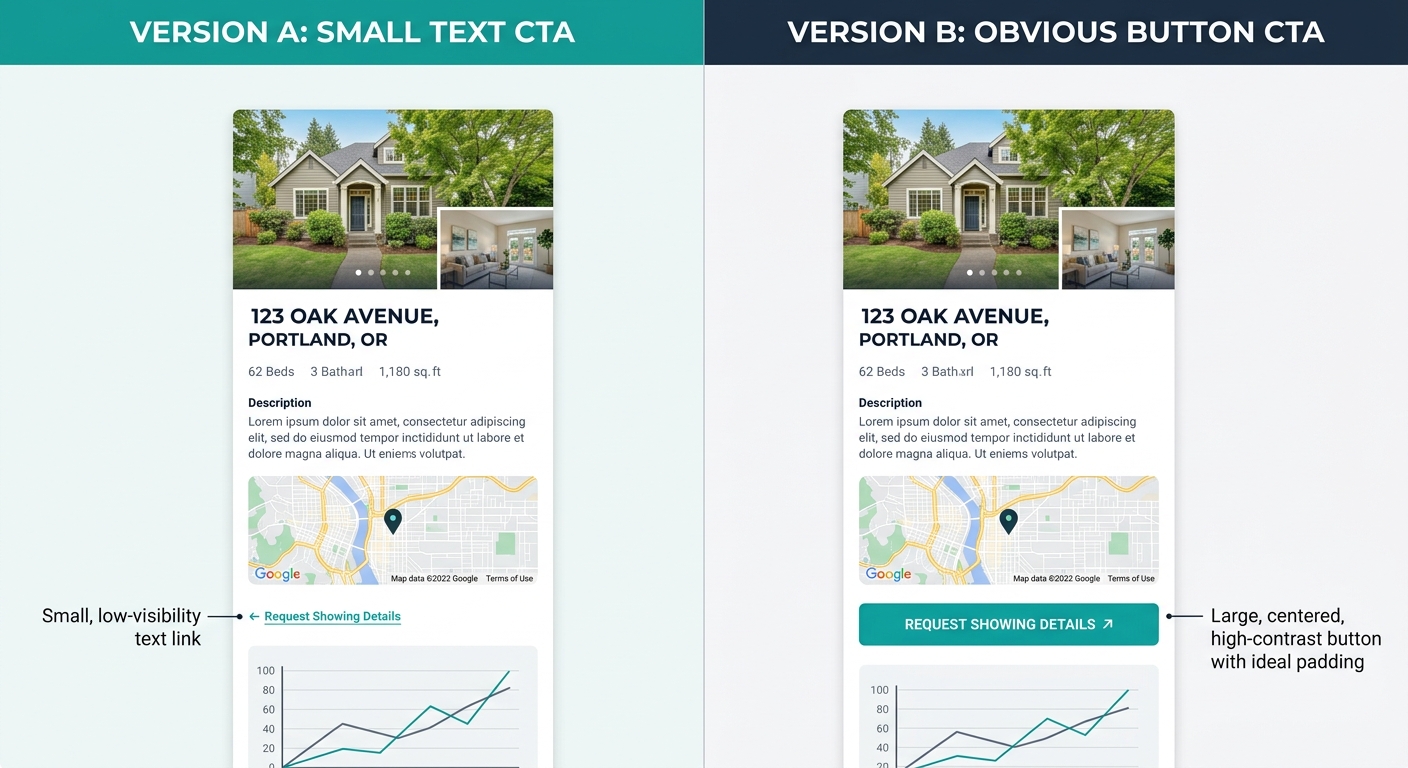
Why does centering a button produce 682% more clicks than left-aligning it? Because screen-reading patterns follow predictable visual paths, and centered elements sit at the natural convergence point of both F-pattern and Z-pattern scanning. This isn’t aesthetic preference. It’s ergonomics. Your visitor’s thumb, on a phone held in one hand, rests naturally in the center-bottom quadrant of the screen. A centered button meets the thumb where it already is. A left-aligned sidebar button requires a deliberate reach that mobile users, making up the majority of real estate search traffic, frequently skip.
Mobile optimization deserves its own scrutiny here. Buttons with touch areas of at least 44 by 44 pixels and adequate surrounding padding increase tap-through rates by 42%, according to mobile UX benchmarking data. The CBRE property management landing page, which scores 70 out of 100 on mobile CTA effectiveness in the same LandingMetrics study, uses large, high-contrast buttons with significant whitespace buffers. Compare that to the typical agent template where the “Contact Me” link is a 12-pixel text hyperlink wedged between a phone number and a social media icon row. The agent who rebuilt their navigation for mobile-first behavior but left their CTAs in desktop-optimized positions has done half the work and captured none of the benefit.
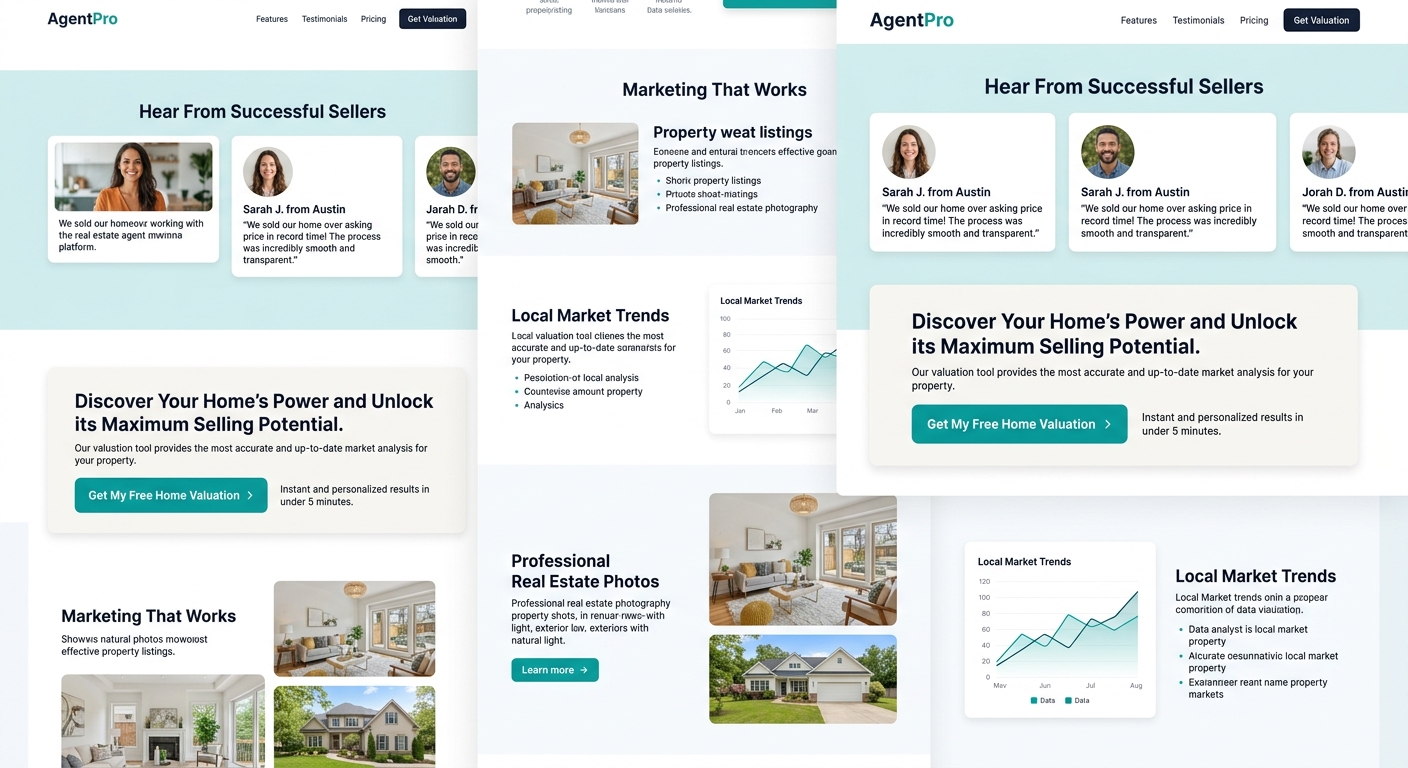
Personalization compounds the geometry advantage. Personalized CTA buttons convert 202% better than generic defaults, dwarfing the 21% uplift from color changes alone. “Get My Free Home Valuation” directed at a seller browsing a market-data page performs at a fundamentally different level than “Contact Us” sitting in a universal sidebar. The specificity of the language tells the visitor what they’ll receive, and the placement within relevant content confirms the offer is contextual rather than generic. Pages that limit themselves to a single primary CTA convert at an average of 13.5%, compared to 10.5% for pages cluttered with five or more competing options, which means the strategic question isn’t how many buttons you have but whether each page has one clear, dominant action that matches the visitor’s intent at that moment.
Personalized CTA buttons convert 202% better than generic defaults, dwarfing the 21% uplift from color changes alone.
Seller Pages Are the Worst Offenders
Buyer-facing pages at least have the IDX integration forcing some kind of action prompt into the experience. The search bar itself functions as a soft CTA, and the “Save This Search” or “Favorite This Listing” micro-actions create engagement touch points that lead toward conversion. Seller pages get no such structural advantage. They’re typically static content pages with a wall of text about the agent’s selling process, a few testimonials, and a generic contact form buried at the bottom. The primary conversion action for a potential seller lead, requesting a home valuation or a listing consultation, sits in the lowest-priority position on the page.
Luxury Presence’s 2026 analysis of real estate CTAs emphasizes using contrasting colors to make buttons stand out from surrounding content and positioning them where they represent a reasonable next step in the user’s decision process. For seller pages specifically, this means placing a “What’s My Home Worth?” button immediately after market data or recent comparable sales, not after three paragraphs of agent biography. Placing buttons directly after testimonials or social proof sections boosts conversions by 25-68%, and seller pages are uniquely suited for this technique because the visitor’s primary anxiety is about choosing the right agent. A testimonial from a satisfied seller followed immediately by a valuation CTA addresses that anxiety at the exact moment it peaks.
The copy matters as much as the position. Action-oriented verbs like “Get,” “Start,” or “Claim” increase conversions by up to 20%, with the optimal button length landing between 2 and 5 words. “Get My Free Rental Analysis” converts at documented higher rates than “Submit” or “Learn More” because it specifies the value exchange. As the team at PropertyManagerWebsites noted, clear direct copy that speaks straight to the target audience outperforms vague alternatives every time. For seller lead capture buttons, this means replacing every instance of “Contact Us” with language that names what the seller receives: a valuation, a market report, a pricing strategy session. The word “free” still works. The word “my” still works. The word “submit” has never worked.
And once that button gets clicked, the clock starts running. Leads contacted within the first five minutes show dramatically higher conversion rates, and interest drops significantly after that window closes. The CTA placement audit connects directly to follow-up infrastructure because a well-placed button that feeds into a CRM with no automated response wastes the placement advantage entirely. The agents whose landing pages capture leads but never close them often have decent CTAs paired with broken backend processes.
What the Audit Reveals About How Agents Think
The uncomfortable truth beneath every CTA placement problem is a mindset problem. Agents treat their websites as digital business cards rather than conversion systems. The business card mentality produces pages designed to look impressive and inform visitors, with the implicit assumption that a sufficiently impressed visitor will find a way to make contact. That assumption fails. Visitors don’t hunt for your phone number the way they might have in 2015. They click the obvious button or they leave, and the average session on a real estate website gives you seconds, not minutes, to present that button.
There’s also a discomfort factor that rarely gets discussed. Many agents feel that prominent, repeated CTAs look aggressive or desperate. They worry about seeming “too salesy” on their own website, which is the one place where a direct ask is not only appropriate but expected. A visitor on your listing page arrived there with intent. They searched for properties in your market, clicked through to your site, and started browsing. Giving them a clear, visible, well-positioned button to take the next step isn’t pushy. Hiding that button beneath 1,500 words of neighborhood description is a disservice to the visitor who came ready to act.
The real estate conversion audit that matters here is simple but revealing: open every page of your site on your phone, scroll through it once at normal reading speed, and note how many seconds pass before you see a CTA. If the answer is more than three seconds on any page, you’ve identified the leak. Then check whether the button text tells the visitor what they’ll get or just what they should do. “Schedule a Tour” tells them what to do. “See This Home Saturday” tells them what they’ll get. The difference between those two phrases, at scale and across hundreds of property pages, compounds into a measurable gap in captured leads per month.
What remains uncertain is how far personalization can push these numbers before it creates friction. A page with dynamic CTAs that change based on visitor behavior, showing “Get Pre-Approved” to first-time visitors and “Compare This to Your Saved Homes” to returning ones, introduces technical complexity that most agent platforms don’t support well. The 202% improvement from personalization assumes clean implementation, and clean implementation requires CRM integration, cookie tracking, and conditional display logic that break easily and fail silently. The agents who benefit most from a CTA placement audit are the ones willing to start with the basics, move the button up the page, change the words on it, make it bigger on mobile, and measure what happens before chasing the more sophisticated automation that the data promises but the technology doesn’t always deliver.