
Websites built on native IDX integration, structured lead capture forms, and CRM-connected data pipelines convert visitors to leads at roughly 2.2%, while sites that look identical on the surface but lack that underlying infrastructure sit below 0.5%. That’s a 4x gap between two sites that might use the same color palette, the same hero image of a lakefront home, and the same “Contact Me” button in the header.
The gap has nothing to do with aesthetics. It comes from what Forbes Advisor calls “information architecture” — the system that determines how property data is organized, how visitors navigate between pages, and how each click feeds context back to the agent before they ever pick up the phone. Your real estate website architecture is the invisible scaffolding that either qualifies leads for you or dumps a pile of anonymous form fills into your inbox.
How Native IDX Changes the Math on Organic Traffic
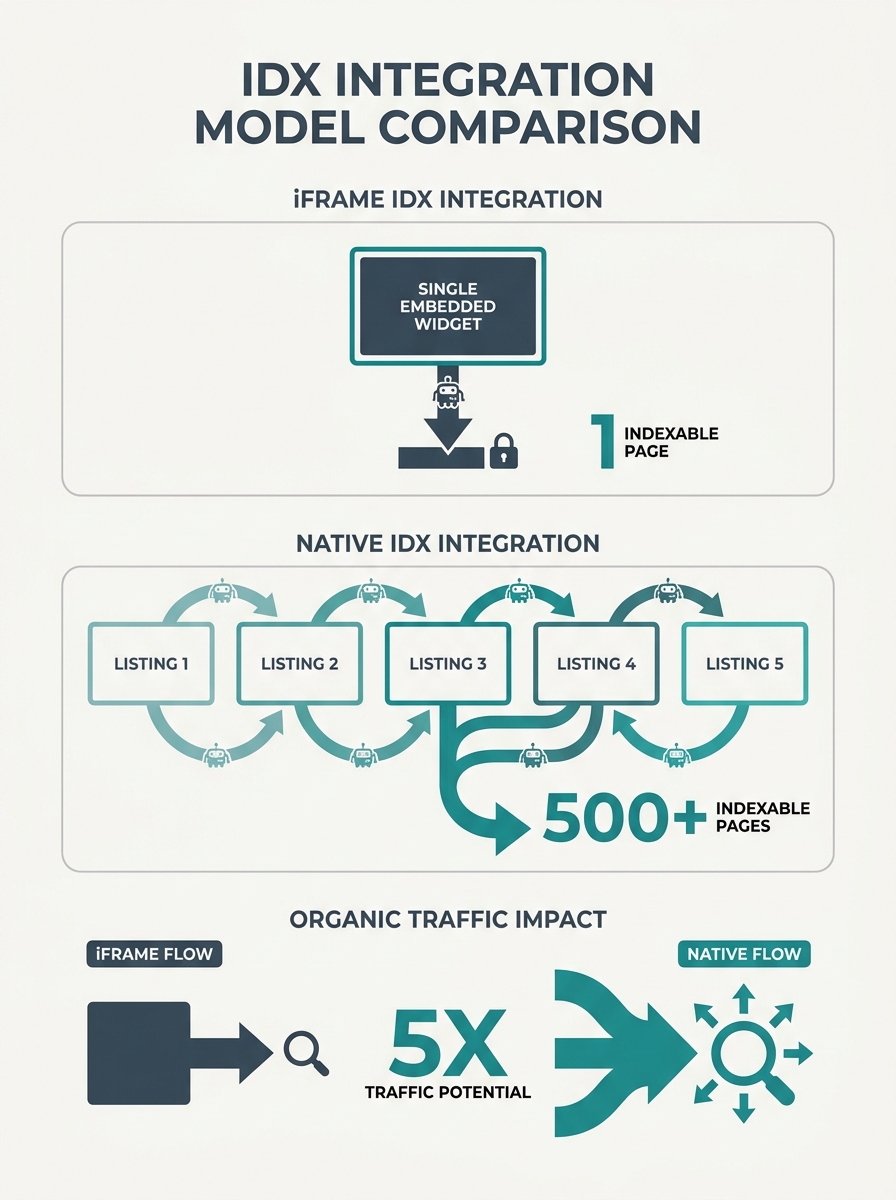
The single biggest architectural decision you’ll make is how your MLS data gets onto your site. There are two paths: iFrame IDX, which embeds a third-party search window inside your pages, and native (sometimes called “organic”) IDX, which pulls listing data directly into your own site’s page structure.
The difference matters because Google can’t index content inside an iFrame. When someone searches “3-bedroom homes in Westlake under $600K,” a site running iFrame IDX won’t show up in those results. A site with native IDX will, because each listing exists as its own indexable page on your domain.
Over time, this compounds. An agent with 800 active listings on native IDX has 800 pages Google can rank. An agent with the same listings on iFrame IDX has one page — the search widget. Property database optimization at this level isn’t about tweaking meta descriptions. It’s about whether your listing inventory even exists to search engines.
If you’re evaluating platforms and wondering what separates high-performing sites from the rest, our breakdown of top agent websites covers several that get this right.
The 5-Minute Window and What Your Forms Should Capture
Responding to a lead within five minutes produces conversion rates 391% higher than waiting even ten minutes. Every agent knows this stat. Fewer agents realize that their lead capture infrastructure determines whether that five-minute response is a productive conversation or a cold call to someone who barely remembers filling out a form.
The problem is what happens between form submission and agent contact. According to research on lead-capture page design, when handoff context is weak, response quality drops and lead value drops with it. The fix is structuring your forms and confirmation steps so your sales team receives:
- The intent path the visitor selected (buying, selling, renting, investing)
- Location and property context (which listing or neighborhood they were viewing)
- Timeline and readiness indicators (pre-approved, browsing, relocating in 90 days)
- Their primary concern or objective in their own words
This structured handoff eliminates the repetitive qualification loops that kill momentum on first calls. Your CRM should receive all of this data automatically, so the agent calling back already knows: “This person was looking at the 4-bed on Maple, they’re pre-approved, and they want to close before school starts.” That’s a fundamentally different call than “Hi, you filled out a form on my website?”
A 4x conversion gap between two visually identical websites comes down entirely to what’s happening underneath — data structure, form logic, and handoff context.
Mobile Performance Isn’t a Feature — It’s the Default Experience
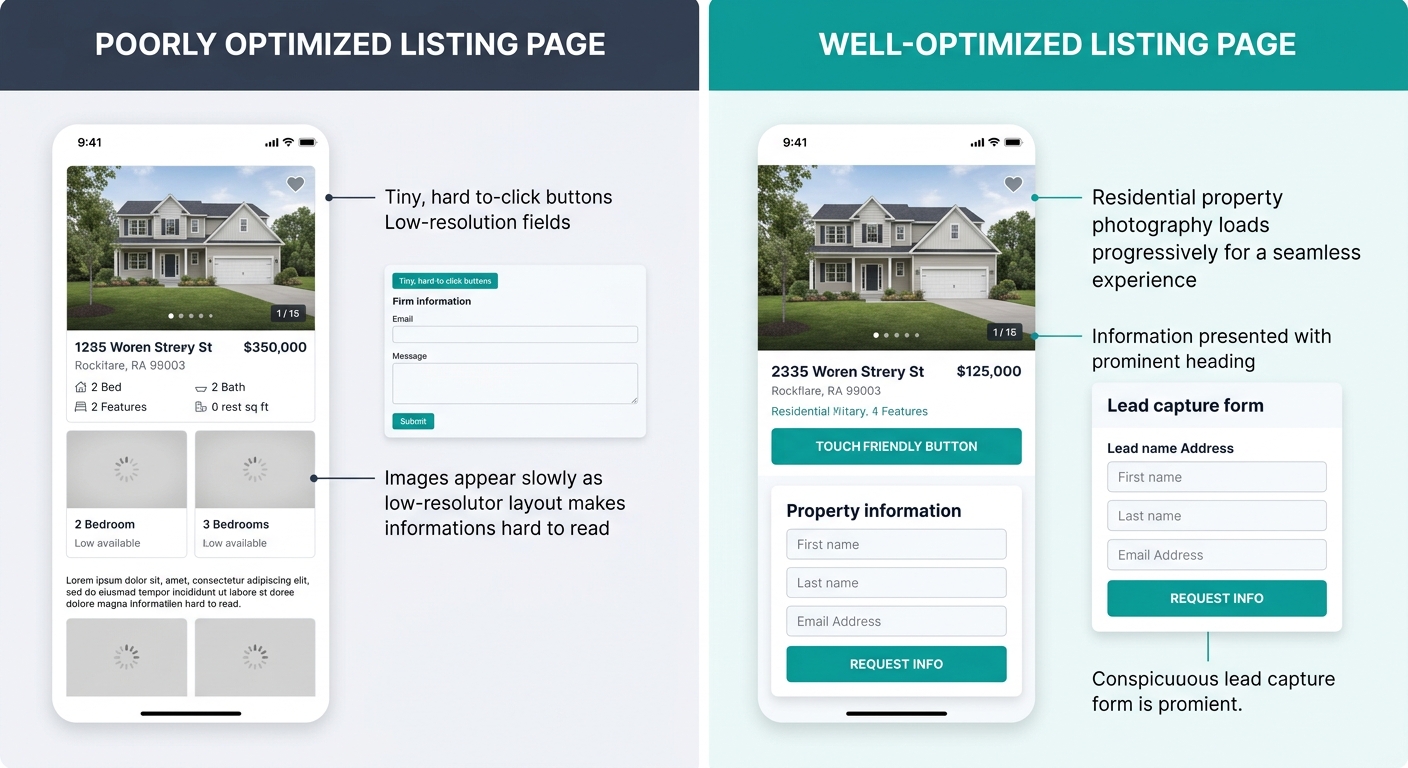
About 73% of real estate searches happen on phones. Google’s mobile-first indexing means the mobile version of your site is your site, period, for ranking purposes. And 53% of visitors leave if a page takes longer than three seconds to load.
So when we talk about website conversion flow, we’re talking about a flow that mostly happens on a 6-inch screen over a cell connection. Touch targets need to be at least 44×44 pixels. Property photo carousels need to load progressively, not all at once. And your lead capture forms need to work with a thumb, not a mouse.
The agents who get this wrong usually don’t know it. They designed their site on a desktop monitor, tested it on their laptop, and assumed the mobile version “looks fine.” But looking fine and performing well are different problems. A form that takes four taps to reach on mobile might as well not exist.
If you’re building or rebuilding a site, Pillar property websites handle the mobile-first infrastructure out of the box, so you’re not debugging responsive layouts when you should be following up with leads.
CRM Integration: Where Architecture Meets Follow-Up
Your website doesn’t close deals. Your follow-up process does. But the website decides how much your CRM knows about each lead before the follow-up begins, and that knowledge gap is where deals die.
Two-way sync between your website and CRM means every property view, saved search, and return visit gets logged against a contact record. When an agent opens that record, they see behavioral data — which listings the lead viewed, how many times they came back, whether they opened the neighborhood guide for Riverview versus Downtown. As Follow Up Boss notes, the integrations worth prioritizing offer two-way sync, clean contact management, activity logging, and dashboards your team will actually use.
Without that integration, your website is generating leads into a void. Agents get a name and phone number. They make a generic call. The lead, who spent 20 minutes browsing luxury condos on your site, gets asked “So what are you looking for?” and mentally checks out.
If you’re exploring how AI can further sharpen this qualification process, we’ve written about how AI-powered lead qualification reshapes follow-up in ways that build on this same data foundation.
Tip: When evaluating any CRM-to-website integration, test the two-way sync first. If saved searches on your site don’t appear in the CRM contact record within seconds, the integration is too loose to be useful.
Progressive Disclosure Keeps Visitors Moving Forward
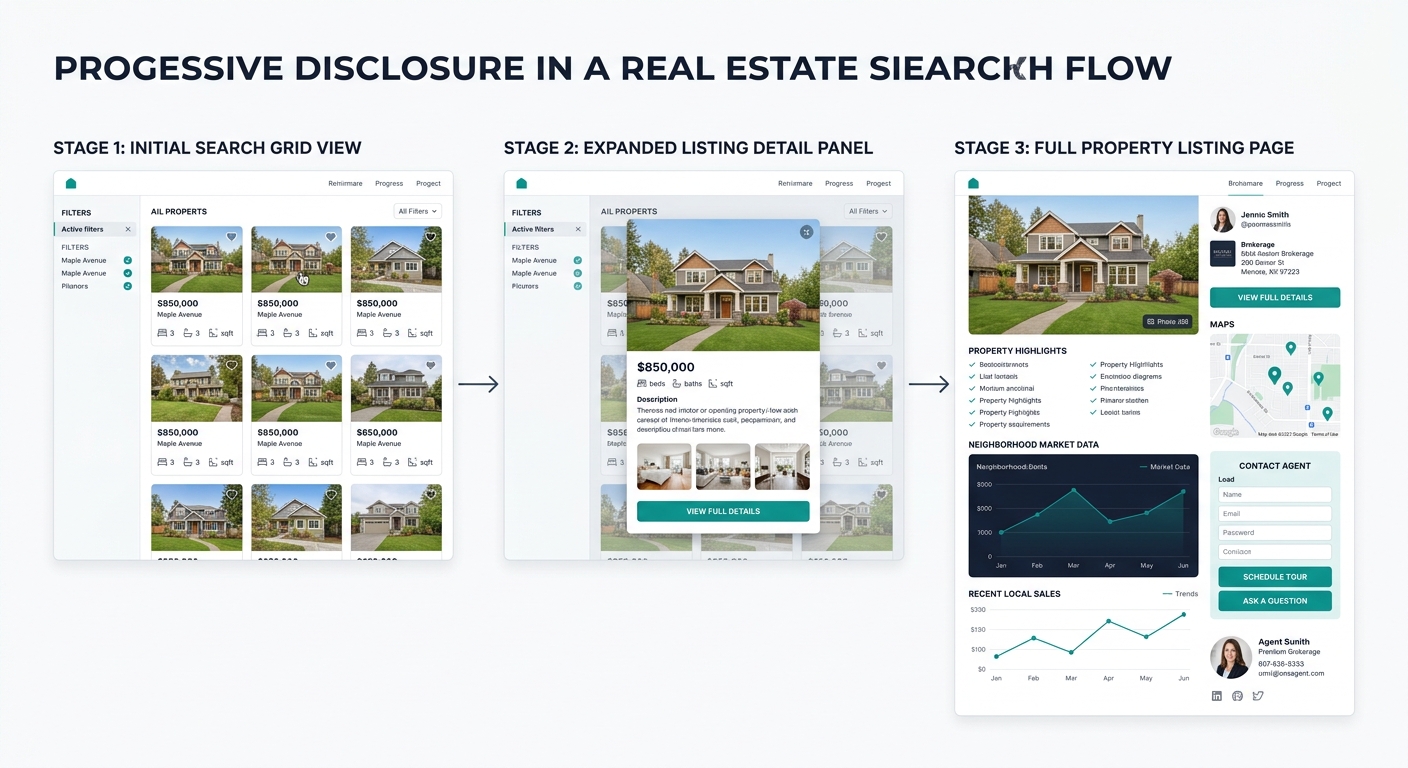
Decision paralysis kills conversions on property search pages. Show 47 filter options on a search page and visitors freeze. Show three — beds, price range, location — and they engage.
This UX principle, called progressive disclosure, means revealing information in layers. The first view shows essentials: price, photo, bed count, location. A click reveals the full listing. Another click reveals the neighborhood data, school ratings, and walkability scores. Each step is a micro-commitment that moves the visitor deeper into your site and closer to a conversion action.
The architecture underneath progressive disclosure matters because it determines what data loads when. If clicking “View Details” triggers a full page reload with 40 high-res images, you’ve broken the flow. If it pulls a lightweight detail panel with compressed images and a “Schedule a Showing” button, you’ve maintained momentum.
Where you place those conversion buttons within this flow is critical, too. The placement patterns that actually produce submissions are covered in our CTA placement playbook, which maps button positions to specific page types.
Hyper-Local Content Pages as Organic Lead Magnets
Over 72% of buyer searches reference a specific neighborhood rather than a city. “Homes in Austin” loses to “homes near Mueller” every time in terms of conversion intent. Building dedicated neighborhood pages with embedded, pre-filtered property searches turns your site into a local authority that Google rewards and buyers trust.
These pages should include median prices, days on market, school ratings, commute time estimates, and walkability data — each point of walkability reportedly adds about $3,250 in perceived home value. But the architectural detail that separates a useful neighborhood page from a thin content page is the embedded search. When a buyer reads about Mueller and then sees a live feed of Mueller listings below the neighborhood summary, the friction between research and action collapses.
This is where property database optimization directly intersects with content strategy. Your IDX data needs to support geographic filtering at the neighborhood level, not just the zip code level. Plenty of IDX providers support city-level searches but break down when you need to serve listings for a specific subdivision or school district boundary.
What Still Isn’t Settled
The gap between well-architected real estate sites and template-driven ones is widening, but several questions remain genuinely unresolved.
AI-driven personalization — dynamically adjusting which listings appear based on browsing behavior — is promising but still immature. The agents using it report mixed results because the recommendation algorithms need months of behavioral data to become accurate, and most real estate sites don’t generate enough traffic volume to train those models well. Smaller brokerages may find that manual curation outperforms algorithmic suggestions for years to come.
The IDX landscape is also shifting. Some MLS boards are experimenting with RESO Web API standards that could make native IDX integration easier and more consistent across markets. But adoption is uneven, and agents in markets with restrictive data-sharing rules still face real limitations on what they can display.
And then there’s the open question of how much architecture you can reasonably maintain as a solo agent or small team. Platforms like Real Geeks bundle CRM, IDX, and lead capture into a single product, which reduces the integration burden but limits customization. The tradeoff between control and convenience hasn’t been resolved, and the right answer depends on your team size, your market, and how much of your lead pipeline already comes from your website versus referrals, social, or paid advertising.
What’s clear is that the template you chose matters far less than what’s running beneath it. Two agents can pick the same theme, and one will generate four times the qualified conversations. The difference lives in the architecture — in how data flows from MLS to page to form to CRM to phone call. Get that pipeline right, and the aesthetics become a nice-to-have rather than a survival concern.