

Form design on your real estate website controls lead data quality before any CRM nurture sequence fires. A 2026 Landbase analysis found 76% of CRM entries are less than half complete, and the root cause traces to capture-stage decisions about field count, conditional logic, and sync architecture that agents treat as afterthoughts.
The Volume Trap in Form Design
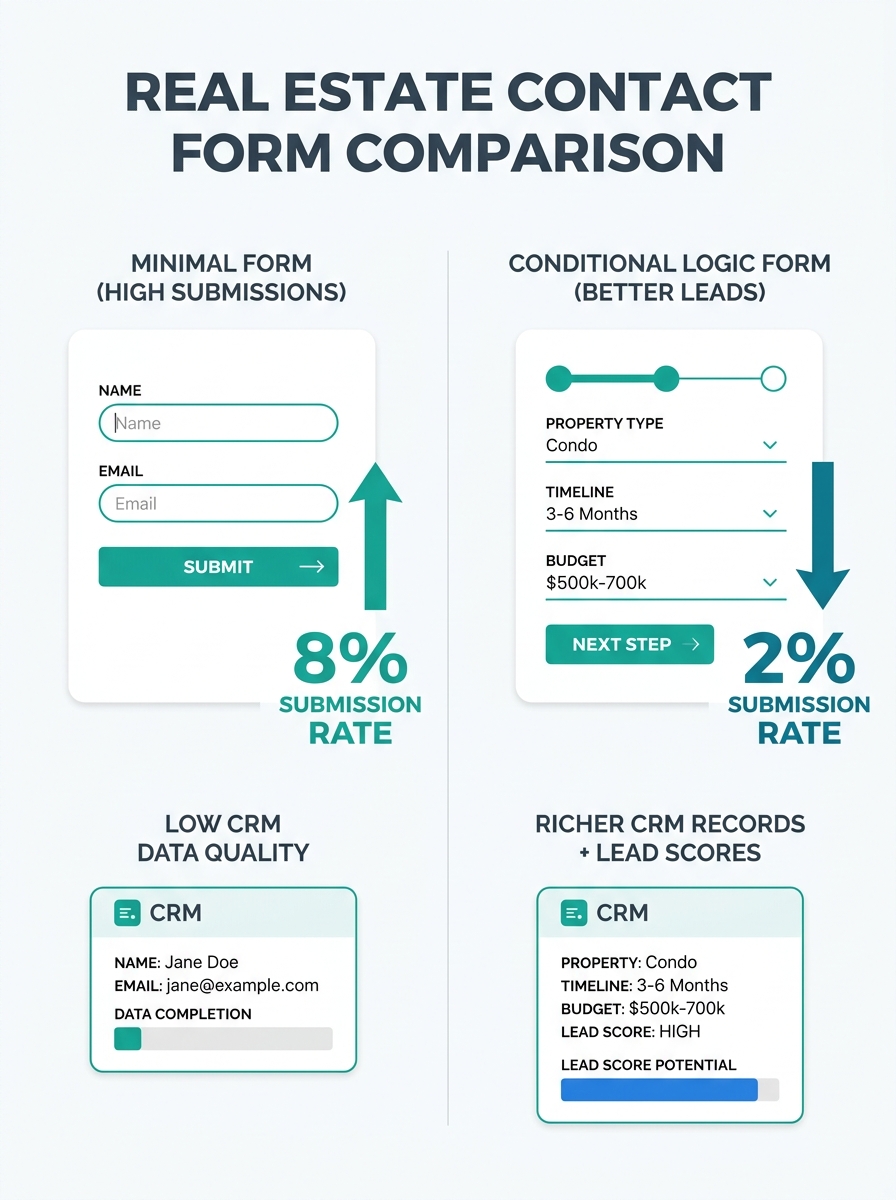
The average web form converts approximately 2.35% of users who click through to a landing page. That number sits low enough to scare most agents into a predictable reaction: strip the form down to two fields, maybe three. Name. Email. Perhaps a phone number. The logic feels sound on the surface. Fewer fields mean less friction, which means more submissions, which means more leads. The math works until you look at what actually lands in your CRM.
A record with a name and email address gives your nurture automation almost nothing to work with. Your CRM can’t score it accurately, can’t route it to the right drip campaign, can’t distinguish a first-time homebuyer browsing $250K condos from an investor scouting $1.2M multifamily properties. Both records look identical in Follow Up Boss, kvCORE, or Wise Agent. Both receive the same generic welcome sequence. Both get the same follow-up call script. The agent who makes that call is working blind, and the lead who answers hears a pitch calibrated for nobody in particular.
This is how landing pages capture leads but never close them. The problem compounds when you realize that a HubSpot study of over 40,000 customer landing pages found that even button copy affects conversion quality. Forms with buttons labeled “Submit” converted at lower rates than forms using specific, outcome-oriented language like “Get Your Home Valuation” or “See Matching Listings.” The button copy signals intent, which means the visitors who do click through are already self-selecting for relevance. Stripping that specificity out of your forms—or defaulting to template copy—erases the one free intent signal your website gives you.
What Breaks Between the Form Submit and the CRM Record
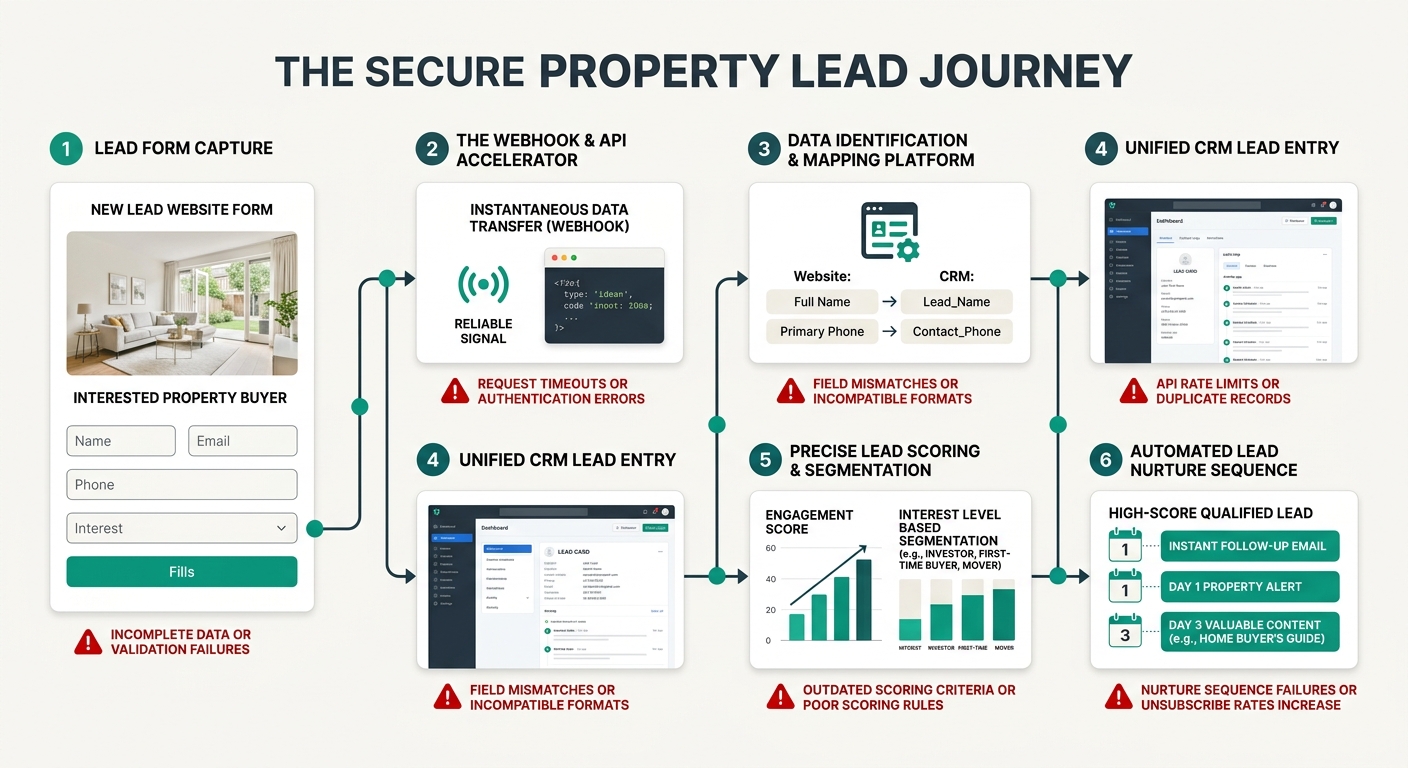
Even when a form captures decent data, the sync between website and CRM introduces its own corruption layer. Real-time API integration is the standard recommendation from platforms like WebFX and BT Web Group, but real-time syncing only matters if the data mapping is correct. A field labeled “Timeline” on your website form might map to a custom field in your CRM that your lead scoring rules don’t reference. A dropdown offering “Buying,” “Selling,” and “Both” might sync as freeform text rather than a tagged category, which means your automation rules can’t parse it for routing.
The IDX-to-CRM data sync problem that affects listing search behavior also plagues contact forms. If your website builder and your CRM come from different vendors—and for 60%+ of agents using platforms like Squarespace or WordPress alongside a standalone CRM, they do—the integration relies on either Zapier, a webhook, or a native plugin. Each handoff point introduces latency and data loss. A Sendspark analysis published May 19, 2026, documented that leads sitting unassigned due to manual routing processes experience rapid decay in responsiveness. The Harvard Business Review figure cited in that same analysis remains sobering: responding within 5 minutes increases the likelihood of qualifying a lead by 21 times compared to waiting 30 minutes.
So the chain looks like this: a visitor fills out your form at 9:14 PM on a Tuesday. The webhook fires but queues behind other events. The record arrives in your CRM at 9:17 PM, missing the “property type” field because the mapping broke in a plugin update two months ago. Your lead scoring assigns a default low score because the record lacks behavioral data. Your automated text sequence doesn’t trigger until the next morning because your rules require a minimum score threshold. By the time an agent sees the lead, 14 hours have passed and the buyer has already scheduled a showing through Zillow. Understanding why response timing matters at this granular level separates agents who close from agents who wonder where their web leads went.
Conditional Logic Changes the Conversion Math
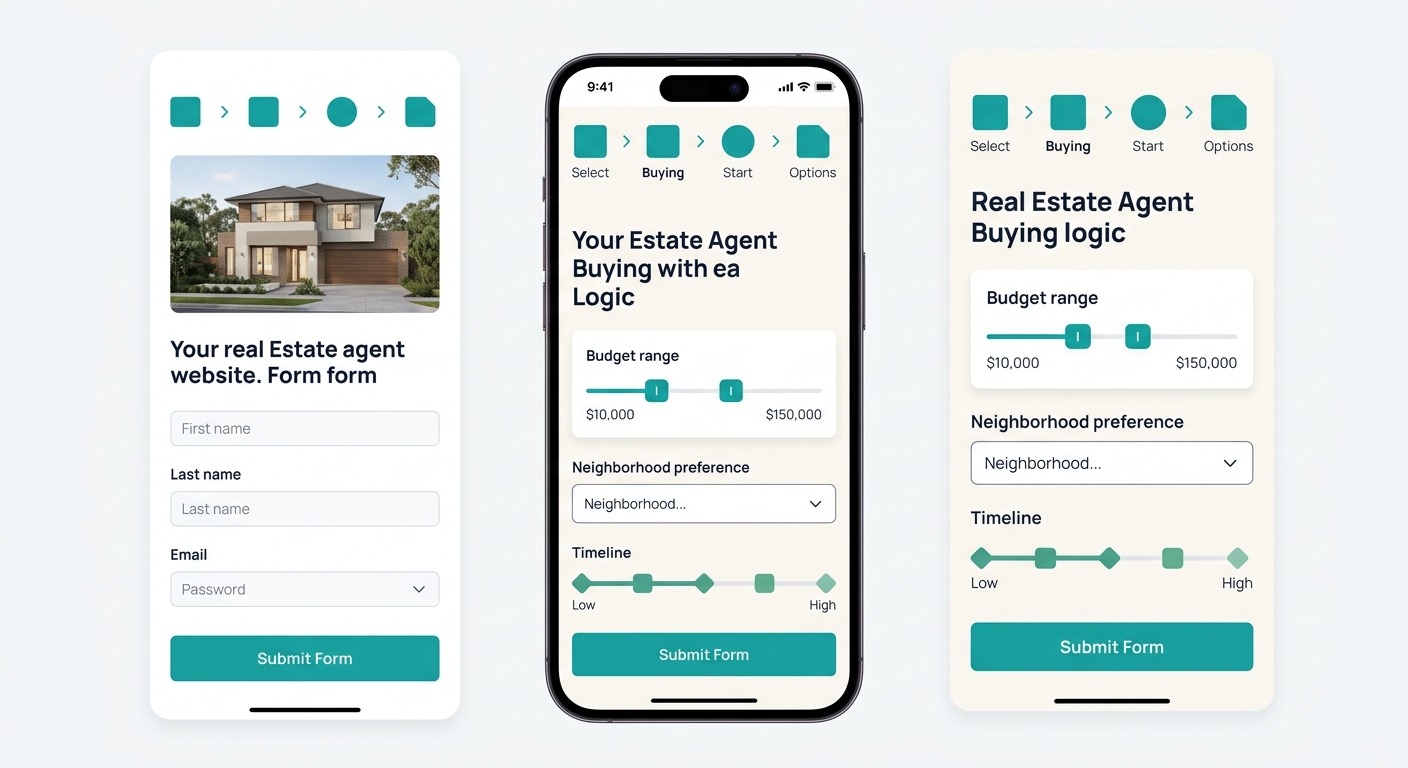
The fix involves accepting a tradeoff that makes most agents uncomfortable: slightly fewer total form submissions in exchange for dramatically richer records. Conditional logic—where the form displays different follow-up questions based on earlier answers—lets you collect 4 to 6 data points without presenting all of them upfront. A visitor who selects “Buying” sees a budget range slider and a timeline dropdown. A visitor who selects “Selling” sees a property type field and a “Have you been pre-approved?” toggle. The form feels short because each visitor only encounters 3 or 4 fields, but the CRM record arrives with enough data to score, route, and personalize accurately.
Progressive profiling takes this further for returning visitors. As Pipeline360’s 2026 lead nurturing guide notes, forms should be pre-filled for known contacts and used sparingly for low-funnel content. If someone already gave you their name and email on a home valuation landing page, the next form they encounter should ask for their neighborhood preference and timeline—not repeat the same two fields. Your CRM accumulates a richer profile over multiple interactions rather than demanding everything in a single sitting. Podium’s 2026 best practices guide reinforces the mechanics: mark mandatory versus optional fields clearly, use placeholder text that tells visitors exactly what format you expect, and ensure touch targets hit at least 44 by 44 pixels on mobile screens for single-column layouts.
The form feels short because each visitor only encounters 3 or 4 fields, but the CRM record arrives with enough data to score, route, and personalize accurately.
Segmentation at the form level also lets you build automated pipelines that separate serious buyers from casual browsers before a human agent ever touches the record. Zuko’s form analytics research shows that different audience segments abandon on different fields and respond to different copy. Organic visitors from a neighborhood search page behave differently from paid ad traffic landing on a home valuation page. When you segment form analytics by traffic source, you can optimize each form independently—adjusting field order, copy, and conditional branches—rather than building one generic form and hoping it works for every visitor type. The conversion form optimization that real estate agents need requires this kind of granularity, not a one-size template applied to every page.
The Tension That Doesn’t Resolve
Here’s where the argument runs into honest friction. Every piece of conversion data confirms that adding fields reduces total submission volume. The 2.35% average conversion rate already frustrates agents who are spending $800 to $2,000 per month on paid traffic. Telling those agents to add conditional logic and progressive profiling—even when the resulting leads are 3 to 5 times more likely to convert downstream—requires them to stomach a visible drop in the one metric their dashboard shows them every morning: new leads today.
The CRM doesn’t surface the quality difference easily. Most real estate CRMs display total lead count as the headline number. Pipeline stages and conversion rates require custom reporting that agents rarely configure. So an agent running stripped-down two-field forms sees 47 new leads this month and feels productive. An agent running conditional-logic forms sees 28 new leads and feels worried. The second agent’s leads close at twice the rate, but that data only becomes visible 60 to 90 days later, long after the emotional reaction to “fewer leads” has already shaped their decisions. The lead data quality that CRM integration depends on remains invisible to the people making website form design choices because the feedback loop is measured in months, not days.
This tension doesn’t have a clean resolution. You can mitigate it with better CRM dashboards, with weekly pipeline reviews that track cost-per-closed-deal instead of cost-per-lead, and with A/B testing that proves the downstream economics. But the fundamental discomfort of watching your lead count drop—even temporarily, even for good reasons—is a real psychological barrier that no amount of data fully overcomes. The agents who push through it tend to be the ones who have already experienced the frustration of calling 50 empty CRM records in a row and getting nowhere. They’ve lived the cost of bad form design. Everyone else keeps optimizing for volume and wondering why their nurture sequences underperform.