

A real estate site redesign without a redirect map, benchmarked rankings, and staged URL validation will cost you 50–70% of organic traffic. SERPRise Agency documented the opposite outcome: a property website that followed every migration step gained 30% organic traffic post-launch. The gap between those results comes down to process.
Benchmarking Everything Before the First File Moves
Before you touch a template, a color palette, or a single line of code, you need a performance snapshot of your current site. This snapshot becomes the baseline against which every post-migration metric gets measured. Without it, you won’t know whether traffic changes are caused by the migration or by seasonal shifts in your market.
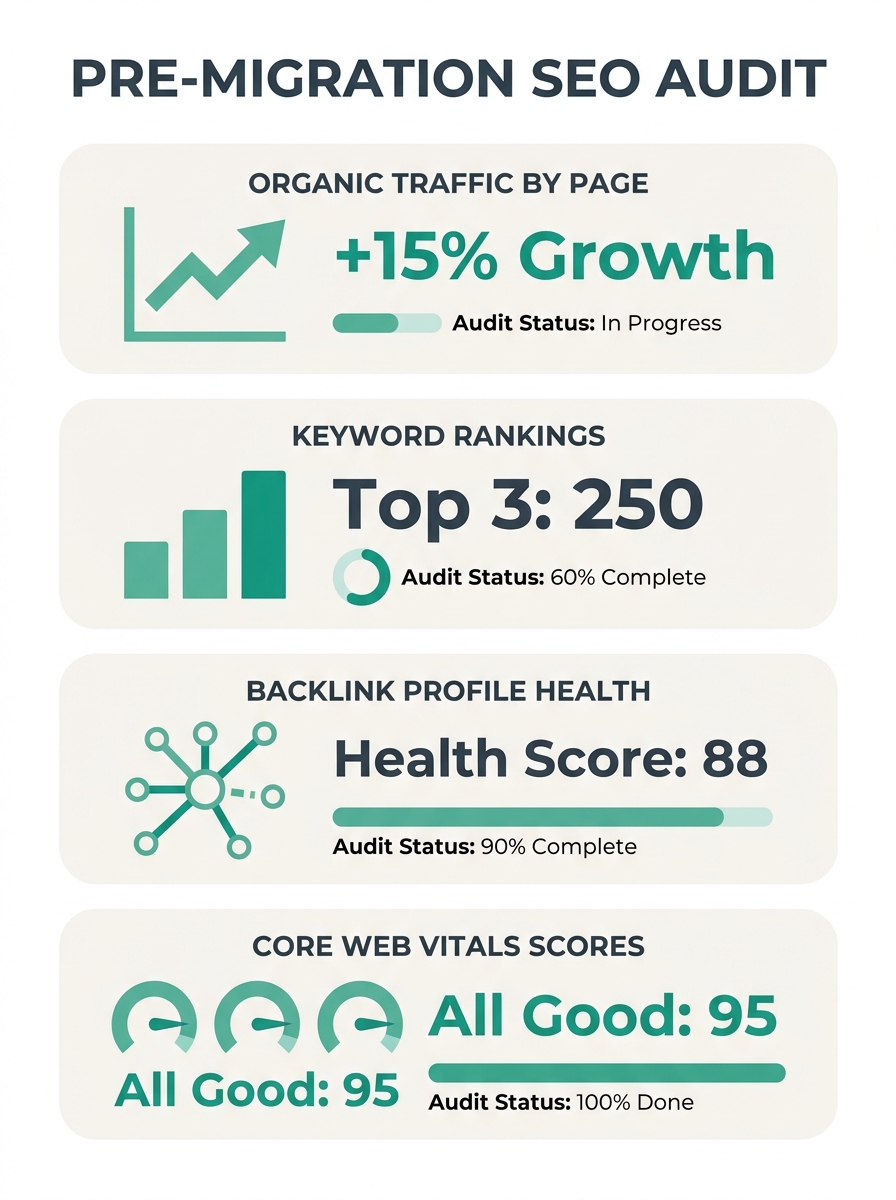
Open Google Analytics and Google Search Console. Export the following for the past 12 months:
- Organic traffic by page, sorted by sessions. Your neighborhood guides, community pages, and top listing pages will likely account for 60–80% of total organic traffic.
- Keyword rankings for your highest-intent terms: “homes for sale in [city],” “[neighborhood] real estate agent,” “[zip code] condos for sale.” Track positions for at least your top 50 keywords.
- Backlink profile from Ahrefs or Semrush. Note which pages carry the most referring domains. These are the pages you absolutely cannot afford to lose during migration.
- Core Web Vitals scores: LCP, INP (which replaced FID in 2024), and CLS. Record these per-page, not just site-wide.
- Indexation count in Search Console. Know exactly how many pages Google has indexed before anything changes.
According to a 2026 Semrush report, sites that benchmarked before migration recovered 90% of traffic within 60 days. Sites that skipped benchmarking recovered only 45% in the same window. That gap alone justifies the 4–6 hours this step takes.
If you’ve never compared your site’s performance against competitors in your farm area, the website benchmarking process is worth running before migration so you understand where you actually stand.
The Redirect Map That Saves Your Rankings
This phase is where website migration SEO succeeds or fails. A redirect map is a spreadsheet with two columns: every URL on your old site in column A, and the corresponding URL on your new site in column B. Every single page gets mapped.
Why does this matter so much for a real estate site redesign? Because your neighborhood pages, sold-listing archives, and agent bio pages have accumulated link equity over months or years. A visitor clicking an old link from Zillow, a local newspaper, or a referring blog needs to land on the correct page. Dumping them on a 404 error page or your homepage destroys both user experience and search value.
The rules for 301 redirects on a property website are specific:
- Map 1:1 wherever possible. Your old “/neighborhoods/lincoln-park” should redirect to the new equivalent, not to a generic “/neighborhoods” index page. Blanket redirects to the homepage dilute link equity across the board.
- Update internal links directly. Semrush’s 301 redirect best practices stress that internal links should skip the redirect chain entirely and point straight to the replacement URL.
- Handle expired listings deliberately. Old property pages for homes that sold two years ago still carry SEO value if they rank for address-based searches. Redirect them to the neighborhood page or a similar active listing page.
- Avoid redirect chains. If Page A already redirects to Page B, and you’re now moving Page B to Page C, make sure Page A redirects directly to Page C. Chains slow crawling and dilute PageRank with each hop.
Americaneagle.com’s migration documentation puts it bluntly: “Properly managing 301 redirects is a must during any website migration. This makes sure users and search engines are directed correctly, preserving SEO and avoiding broken links.”
SUSO Digital’s SEO team has emphasized a complementary point for property sites specifically: “Every high-value URL must map to its closest topical equivalent to preserve link equity and rankings.” Generic redirects to the homepage count as lost equity.
For a typical real estate site with 200–500 pages including listing archives, building this map takes 8–15 hours. Budget the time. Skipping it is the single most common reason agents lose organic traffic during redesigns.
Content Consolidation During Staging
Once the redirect map exists and the new site is being built in a staging environment, you face a strategic decision: do you migrate every page, or do you use the redesign as an opportunity to consolidate weak content?
The SERPRise Agency case study is instructive. Their real estate client didn’t blindly move every old page to the new site. Pages the team considered valuable but not part of the new structure were redirected to appropriate locations. The core of their approach, according to their writeup, was “redesigning the website and creating new static pages” purpose-built for the keywords they wanted to capture.
Organic traffic preservation doesn’t require preserving every page. It requires preserving every page that earns traffic or carries backlinks, and improving or consolidating everything else.
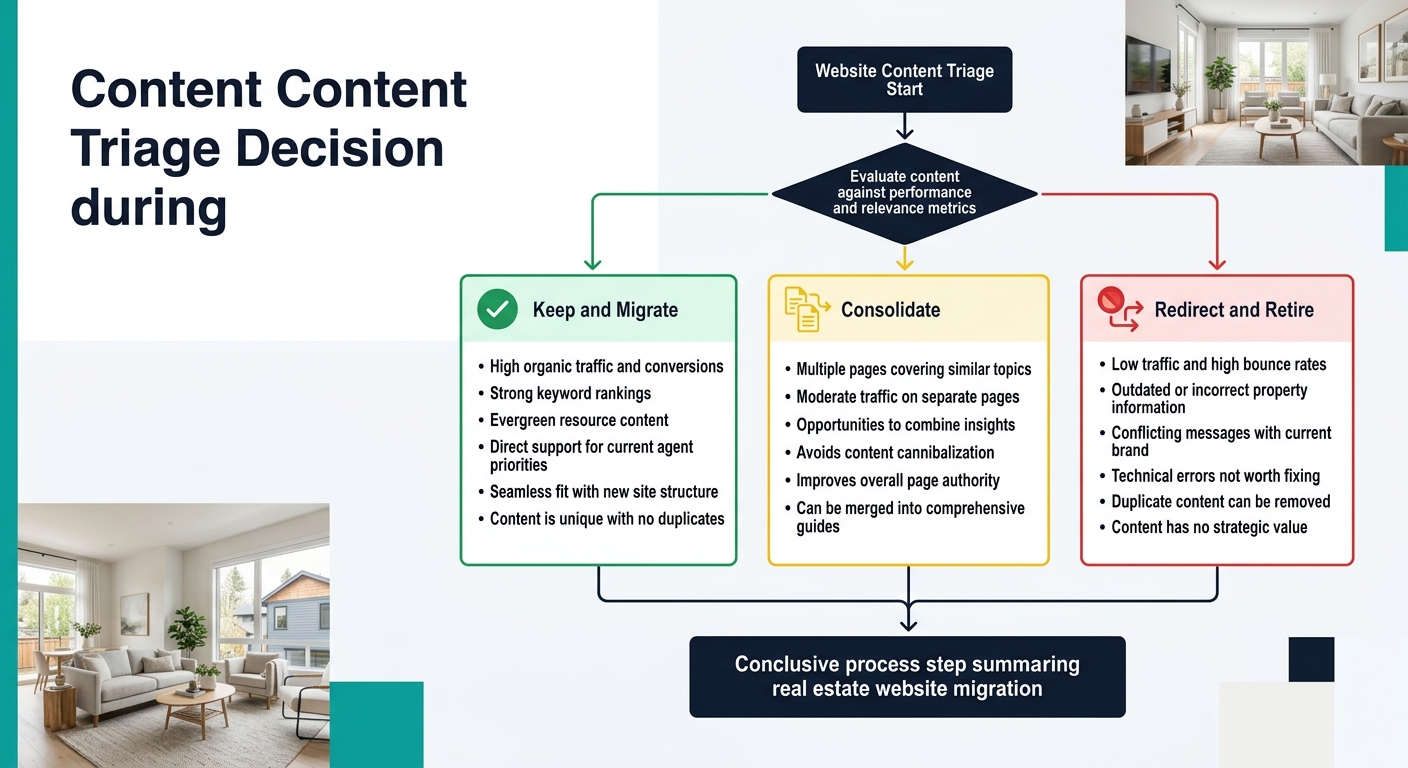
Run this triage across your content inventory:
- Keep and migrate: Any page with more than 50 organic sessions per month, or more than 5 referring domains. Migrate it with metadata intact or improved.
- Consolidate: Thin pages covering overlapping topics. If you have three neighborhood pages for adjacent areas each pulling 10 visits per month, combine them into one stronger page and redirect the other two.
- Redirect and retire: Old blog posts with zero traffic, outdated market reports, and duplicate listing pages. Point them at the nearest relevant page.
Ninja Promo’s 2025–2026 aggregate data found that in 9 out of 10 successful migrations, organic traffic grew an average of 19% within six months. The growth came specifically because teams optimized content during migration rather than copying everything over unchanged.
If you’ve built neighborhood content hubs or hyperlocal pages, those are almost certainly your highest-value organic assets. They get priority in the redirect map and the most careful treatment during staging.
Organic traffic preservation doesn’t require preserving every page. It requires preserving every page that earns traffic or carries backlinks, and improving everything else.
Launch Day and the First 48 Hours
Launch your redesigned site during a low-traffic window. For most real estate markets, that means Saturday evening or early Sunday morning. Property searches peak on weekday evenings and Sunday afternoons, so you want any indexing issues resolved before the next traffic wave.
Here’s the launch-day sequence:
- Push the new site live. Test a random sample of at least 50 URLs from your redirect map to verify all 301 redirects fire correctly.
- Submit the updated XML sitemap through Google Search Console immediately. Remove the old sitemap if URL structures changed.
- Check robots.txt. Staging environments routinely include a “Disallow: /” directive that blocks all crawling. Forgetting to remove this line before launch is one of the most destructive migration mistakes. SUSO Digital has reported that migrations ignoring basic technical checks like this saw 30–50% longer recovery times.
- Verify that schema markup (LocalBusiness, RealEstateListing, FAQ, Article) transferred to the new site. BrightEdge’s 2025 analysis found that 97% of top-ranking real estate pages use structured data. Losing schema during migration costs you rich snippet visibility and AI search citations.
- Run a full crawl using Screaming Frog or Sitebulb to catch 404 errors, redirect loops, and missing canonical tags.
Warning: The most dangerous migration mistake for real estate sites is launching with the staging robots.txt still blocking crawlers. Google will deindex your entire site within days. Check this file before launch, after launch, and again the next morning.
Within 48 hours, monitor Search Console’s “Pages” report for spikes in “Not found (404)” or “Page with redirect” errors. A few dozen are normal during reindexing. A few hundred means your redirect map has critical gaps that need immediate attention.
The 60-Day Recovery Window
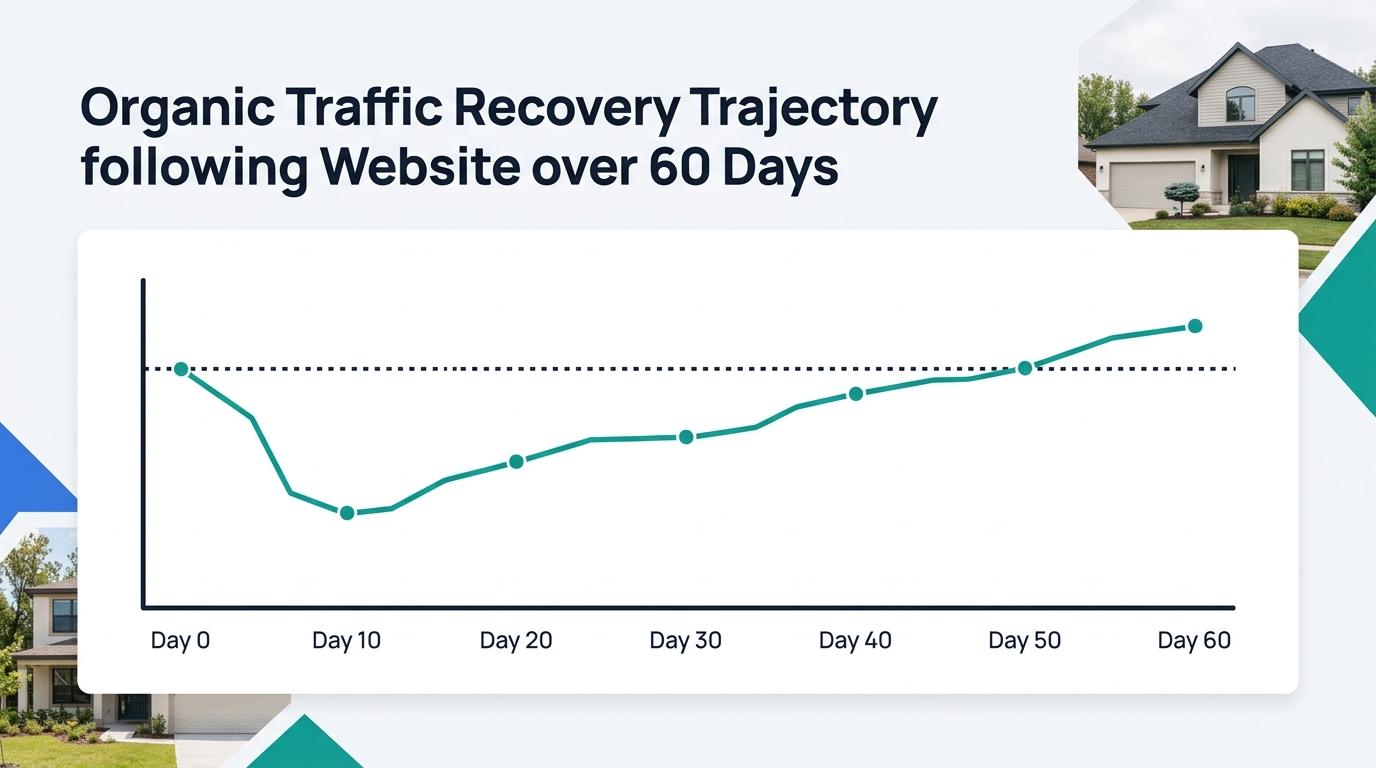
Expect a temporary organic traffic dip. Every migration produces one, regardless of how well you execute. DigitalThrive AI’s migration guidance frames it clearly: “Do not panic if organic traffic drops immediately after migration. This is normal.” But recovery should begin within 2–3 weeks. If it doesn’t, something structural went wrong.
Redirect maps are critical for maintaining link equity and preventing 404 errors, but even perfectly executed redirects take time for Google to process. The search engine needs to recrawl your entire site, update its index, and recalculate PageRank across the new URL structure.
Here’s what a healthy recovery timeline looks like for a real estate site:
| Timeframe | Expected Behavior | Action Required |
|---|---|---|
| Days 1–7 | 10–30% traffic drop | Monitor for 404 spikes; fix broken redirects immediately |
| Days 8–21 | Traffic stabilizes at 70–85% of pre-migration levels | Submit new pages for indexing; check keyword rankings daily |
| Days 22–45 | Gradual recovery to 90–95% | Audit long-tail keyword performance; find silent leaks |
| Days 46–60 | Full recovery or improvement | Compare against pre-migration benchmarks |
If you’re still down more than 20% at the 60-day mark, look for structural problems: missing redirects, lost backlinks from external sites that haven’t updated their links, or content that was consolidated too aggressively.
During this window, pay close attention to your property page hierarchy and internal linking. Search engines re-evaluate how pages relate to each other after a migration, and weak internal linking structures that Google tolerated on the old site can surface as ranking problems on the new one.
Where the Data Lands Now
The evidence from real estate site redesign projects through early 2026 tells a consistent story. Migrations that follow the benchmark-map-consolidate-monitor sequence recover organic traffic and frequently improve it. SERPRise’s client saw 30% growth. Ninja Promo’s aggregate data across multiple property clients showed 19% average growth within six months. These aren’t outlier results; they’re the expected outcome when the migration process is complete.
The agents and brokers who lose traffic during a redesign almost always skip the same steps: no pre-migration benchmark, no 1:1 redirect map, no content triage, and no monitoring plan for the 60-day recovery window. Those four gaps account for the vast majority of organic traffic destruction during real estate website migrations.
Your site’s design system and visual consistency will look better after the redesign. Whether your organic visibility survives the transition depends entirely on the work you do before launch day, the redirect map you build during staging, and the 60 days of disciplined monitoring that follow. The data from agencies tracking these migrations is unambiguous: the process works when you follow it completely.